Main-site server list
The public viewer lives at /servers.html. Reachable hosts can publish live slots, password status, version, and world label without exposing secrets.
 Home
Home
CaretakerMP Wiki
User-facing release guide for private CaretakerMP sessions: Windows launcher setup, Linux hosting, invite import, synced-world install, overlay controls, support packs, player passports, and safe world rollback.
Guides
Import an invite, run Preflight, install the hosted world, start the game, and use the overlay.
WindowsUse the Windows launcher, install the hook, create support packs, and move your Player Passport.
HostsStart the Server GUI, publish a world, copy invites, package a friend build, and check session health.
DiscoveryAdvertise reachable servers to the main-site viewer at /servers.html with live slots, password flag, version, and world label.
Set up a small Ubuntu or Debian host with Node.js, systemd, UDP gameplay, and TCP world sync.
ReferenceBrowse player commands, host commands, overlay hotkeys, and server-side Lua resource features.
ScriptingAdd simple Lua resources for welcome messages, crew commands, markers, checkpoints, teams, and activities.
HelpCreate sanitized support packs, export a Passport, and restore a local world backup when needed.
Release features
The public viewer lives at /servers.html. Reachable hosts can publish live slots, password status, version, and world label without exposing secrets.
Server GUI blocks public listing startup for loopback, private, reserved, path-like, and host-with-port values so failed listings are visible immediately.
Use Auto second player or /secondplayer after one real player joins to verify snapshots, radar, and cleanup without asking another friend to connect.
Private session proof
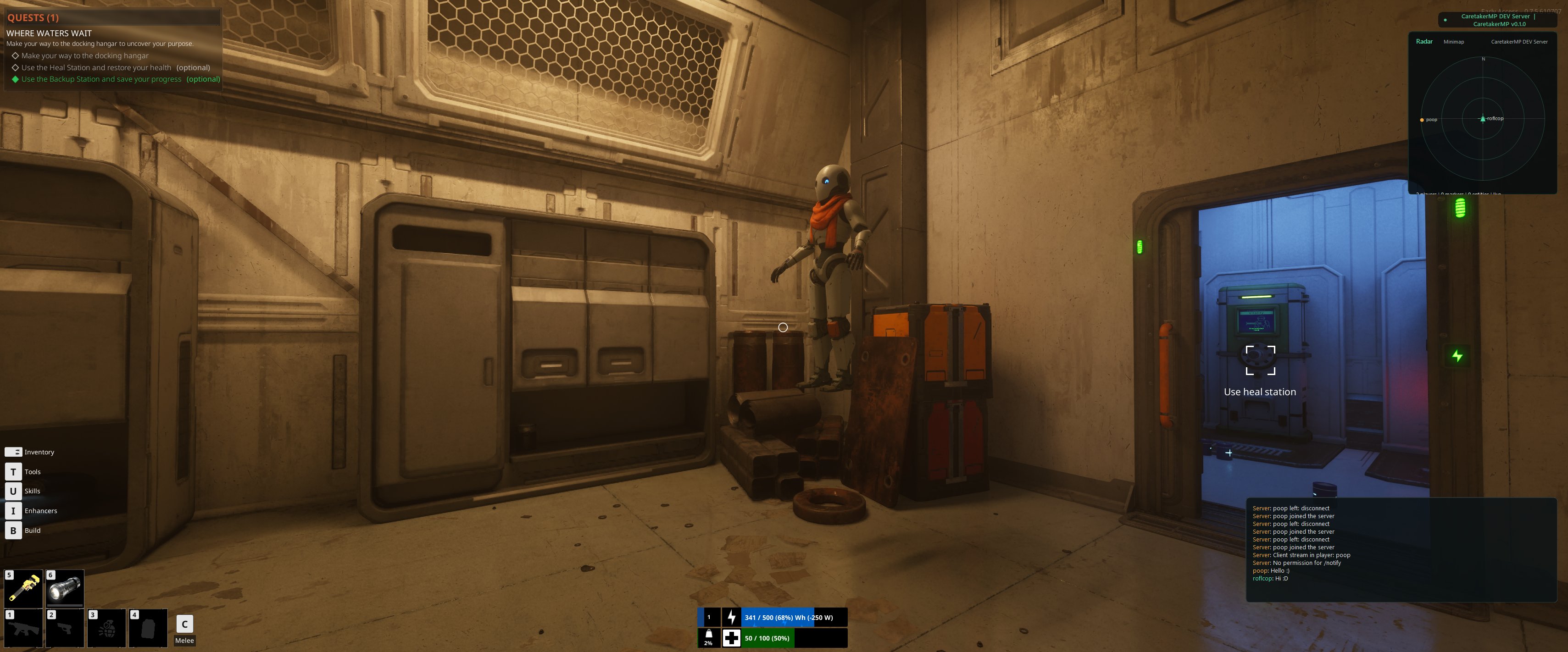
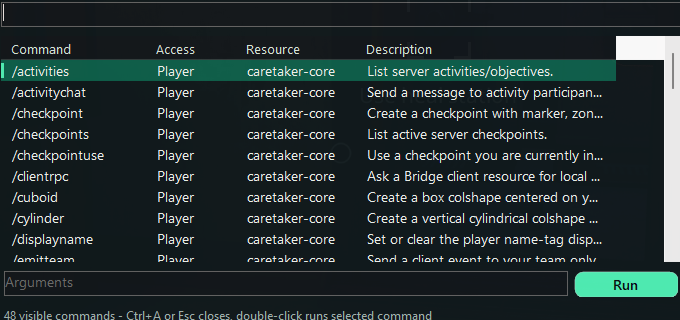
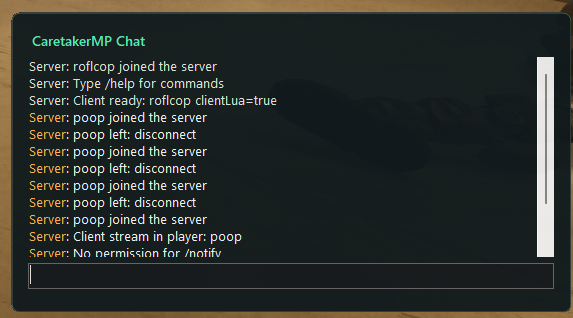
These private session captures show two connected player signals in the overlay radar, live session messages in chat, and the command browser running inside the game. The core loop is visible: connect, stream a player, communicate, and use session tools without leaving the game.
Scripting
A resource is a folder with resource.json and Lua files. It can add commands, events, timers, markers, teams, activities, and world metadata.
Put the folder under dist/windows-x64/resources or the custom resources folder selected in Server GUI.
Use Server GUI to check scripts before guests join. Then start or reload the resource without repackaging the whole server.
Player flow
Extract the host's Friend Pack, then run CaretakerMP.Launcher.exe from the CaretakerMP folder.
Copy the host's cmp://join invite, click Import Invite, and let the launcher create the server profile.
Check runtime files, game path, SaveGames folder, hook files, server version, and world availability before launch.
Use Preview World to see added, overwritten, unchanged, and local-only SaveGames files before anything is changed.
The launcher verifies the bundle, creates a World Safety Vault backup, installs the hosted world, and records the expected save label.
Smart Launch Guard checks that the installed world matches the selected server, then starts Bridge, the game, and the overlay tied to the exact game PID.
Host flow
Set host, ports, max players, resources folder, save folder, and a private server password.
Check files, resources, ports, server health, version, and protocol before inviting friends.
Choose a SaveGames folder, enter a shared world name, in-game save label, note, and uploader, then publish.
Create a cmp://join invite and decide whether the private password should be included for trusted friends.
Build a clean ZIP with exes, assets, resources, hook template, docs, quickstart, manifest, and checksums.
Create a sanitized diagnostics ZIP when a player reports trouble. Passwords, private connection values, paths, and identities are redacted.
Enable Auto second player or run /secondplayer Echo me from the host chat to confirm snapshots, radar, and Bridge player updates before inviting more players.
Overlay
Open the chat input panel while the passive chat feed stays click-through.
Open the connected-player menu with role, playtime, ping, dimension, and identity details.
Open the command browser and see what the current session allows you to use.
Open Crew HUD for server status, ping quality, command availability, and recent presence.
Open Signal Doctor for Bridge, inbox, snapshot, command, chat, and control-pipe health.
Send common session commands from one-click controls.
Search recent chat, commands, server updates, and player events.
Open Radar/Minimap for live local transform, nearby players, streamed entities, markers, checkpoints, and colshape zone markers.
Optional support
CaretakerMP is free to use. A donation is never required and does not unlock anything; it helps cover hosting, tooling, verification time, and the routine maintenance that keeps releases usable.
Boundaries
CaretakerMP does not ship game binaries, extracted assets, keys, decrypted content, DRM bypasses, anti-cheat bypasses, or proprietary mappings. Use it with a legitimate local game install.